
Introduction
The Midland BR200 is a UHF Business Band two-way radio designed for professional environments. With 16 channels, durable design, and extended battery life, it provides reliable communication in warehouses, offices, retail, construction sites, and more.
Package Contents
BR200 Radio
Antenna (detachable)
Li-ion Battery Pack
Desktop Charger
AC Adapter
Belt Clip
Owner’s Manual
Specifications
Frequency Range: UHF 450–470 MHz
Channels: 16 preset business frequencies
Channel Spacing: 12.5 kHz
Power Output: 2 Watts
Dimensions (with antenna): 4.7" x 2.1" x 1.2"
Weight: 8.6 oz (with battery)
Battery: 1800 mAh Li-ion, up to 21 hours of use
Controls & Buttons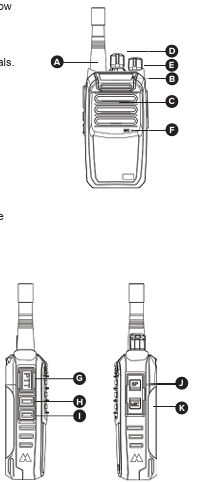
A. Antenna – Fixed, non-removable.
B. LED Indicator
Green – Receiving signal
Red – Transmitting
C. Speaker
D. Channel Selector Knob – Selects channels 1–16.
E. Power/Volume Knob – Rotate clockwise to power ON and increase volume; counterclockwise to decrease/turn OFF.
F. Microphone
G. PTT (Push-to-Talk) Button – Hold to transmit.
H. Monitor On/Off
I. Scan On/Off
J, Accessory Port – For headsets, speaker mics, or programming cable.
K. Rechargeable Battery Pack
LED Indicator Guide
Red (Solid) – Transmitting
Green (Solid) – Receiving signal
Orange (Blinking) – Scanning active
Red (Blinking) – Low battery
Battery & Charging
Attach battery to radio by sliding it into place until it clicks.
Plug AC adapter into wall outlet and connect to charger base.
-
Place radio in charger; LED on charger shows charging status.
Red LED – Charging
Green LED – Fully charged
Typical charge time: ~4 hours.
Battery Life Expectancy: ~500 charge cycles.
Best Practices:
Fully charge before first use.
Do not overcharge (remove from charger when green).
Store battery in a cool, dry place if not used for extended periods.
Basic Operation
Power On/Off – Turn volume knob clockwise to power on; counterclockwise to turn off.
Select Channel – Rotate channel selector to desired channel (1–16).
Transmit – Hold PTT, speak clearly into mic. Release to listen.
Receive – Release PTT to listen.
Adjust Volume – Use volume knob.
Programmable Features
(Software and programming cable required for customization.)
Channel Frequencies
Privacy Codes (CTCSS/DCS)
Side Key Assignments (Monitor, Scan, VOX, etc.)
Time-Out Timer
Squelch Level
Advanced Features
Channel Scan: Press Side Key 2 (default) to activate scan mode.
Monitor Mode: Hold Side Key 1 to open squelch and check weak signals.
VOX (Hands-Free Mode): Can be enabled via software.
Busy Channel Lockout: Prevents transmission if channel is in use.
Troubleshooting Guide
| Issue | Possible Cause | Solution |
|---|---|---|
| Radio won’t power on | Battery not charged or inserted | Recharge or reinstall battery |
| Short battery life | Battery not fully charged or expired | Recharge fully / replace battery |
| Can’t transmit | Out of range, wrong channel/code | Move closer / check settings |
| Can’t hear incoming calls | Volume too low, wrong channel/code | Adjust volume / match channel |
| Charger not working | Outlet faulty or contacts dirty | Try new outlet / clean contacts |
| LED blinks red | Battery is low | Recharge battery |
Safety & Licensing
FCC License Required: The BR200 operates on UHF business frequencies. Users must hold a valid FCC Part 90 license.
Compliance: Meets FCC Part 15 and Part 90 rules.
Safety: Do not operate near blasting caps, in explosive atmospheres, or while refueling.
Warranty
2-Year Manufacturer’s Warranty
Covers defects in material and workmanship
Does not cover damage due to misuse, modification, or normal wear
- Submit requests for BizTalk warranty repairs and replacements here.
Comments
0 comments
Please sign in to leave a comment.