
Introduction
The Midland MB400 is a professional-grade UHF business two-way radio designed for reliable communication in demanding environments.
For support, contact Midland at (816) 241-8500 (9 AM–4 PM CT, Mon–Fri).
Features
4 or 16 channel operation (programmable)
450–470 MHz UHF frequencies (FCC license required)
5 Watts transmit power
High/Low power setting
260 privacy codes (CTCSS/DCS)
Channel scan and monitor functions
VOX (voice-activated transmit)
Battery save mode
Busy channel lockout
Time-out timer
Keypad lock
Compatible with cloning cable for quick programming
Programmable via PC software
NOAA Weather Alert (optional programming)
FCC Licensing
The MB400 operates on UHF business frequencies requiring an FCC license for legal use in the United States.
For more details, visit fcc.gov or call 1-888-CALL-FCC.
Getting to Know Your Radio
Controls and Indicators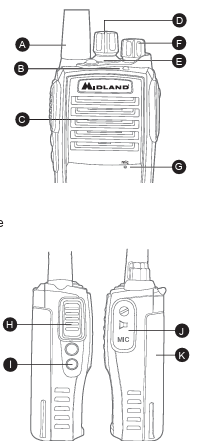
A. Antenna – Fixed, non-removable.
B. LED Indicator
Green – Receiving signal
Red – Transmitting
Blinking Orange – Scanning
C. Speaker
D. Channel Selector Knob – Selects channels 1–16.
E. Emergency Call - Send emergency alert to other MB400s on the same frequency
F. Power/Volume Knob – Rotate clockwise to power ON and increase volume; counterclockwise to decrease/turn OFF.
G. Microphone
H. PTT (Push-to-Talk) Button – Hold to transmit.
I. Programmable Side Keys
J, Accessory Port – For headsets, speaker mics, or programming cable.
K. Rechargeable Battery Pack
Battery Installation & Charging
Align battery contacts with the radio contacts.
Press battery into place until it clicks.
To remove: Slide battery latch downward and lift battery away.
-
To charge:
Place radio in supplied desktop charger.
LED on charger: Red = charging, Green = fully charged.
Initial charge: 4–6 hours before first use.
Basic Operation
Turning the Radio On/Off
Turn the Power/Volume knob clockwise until click to power ON.
Turn counterclockwise until click to power OFF.
Adjusting Volume
Rotate Power/Volume knob after turning radio ON.
Selecting a Channel
Rotate Channel Selector knob to desired channel (1–16).
Transmitting
Hold PTT, speak clearly into microphone (2–3 inches away).
Release PTT to listen.
Programmable Features (via PC or Dealer)
Channel Frequency
High/Low Power Setting
CTCSS/DCS Privacy Codes
VOX Sensitivity
Scan List Programming
Side Key Functions
Time-Out Timer
Busy Channel Lockout
Cloning
Use Midland cloning cable to duplicate settings between radios.
Connect both radios, set to clone mode, initiate from master radio.
Care and Maintenance
Clean with a soft, damp cloth.
Do not submerge or expose to solvents.
Use only Midland-approved accessories.
Technical Specifications
| Parameter | Specification |
|---|---|
| Frequency Range | 450–470 MHz UHF |
| Channels | 4 or 16 (programmable) |
| Output Power | 5 W / 2 W |
| Battery Type | Li-Ion rechargeable |
| Dimensions | Approx. per manual |
| Weight | Approx. per manual |
Factory Default Programming
The MB400 ships from the factory with the following default frequencies and settings. Each channel can be reprogrammed as needed (FCC license required).
| Channel | Frequency (MHz) | Bandwidth | Power | CTCSS/DCS |
|---|---|---|---|---|
| 1 | 464.500 | 12.5 kHz | High | None |
| 2 | 464.550 | 12.5 kHz | High | None |
| 3 | 467.7625 | 12.5 kHz | Low | None |
| 4 | 467.8125 | 12.5 kHz | Low | None |
| 5 | 467.8500 | 12.5 kHz | Low | None |
| 6 | 467.8750 | 12.5 kHz | Low | None |
| 7 | 467.9000 | 12.5 kHz | Low | None |
| 8 | 467.9250 | 12.5 kHz | Low | None |
| 9–16 | Unprogrammed (blank by default) | — | — | — |
Note: Channels 1–8 are pre-loaded business frequencies. Channels 9–16 can be programmed with additional business, weather, or custom frequencies using Midland’s programming software.
Limited Warranty (U.S. Only)
- Two-year warranty from date of purchase on radios.
- 90-day warranty on accessories.
- Does not cover misuse, water damage, or unauthorized repair.
- Submit warranty claims in the Midland Returns and Claims Portal
Download the full owner's manual here.
Comments
0 comments
Please sign in to leave a comment.